Draw Anime - AR Tracing App
- 4.4
- Rating
- 50.00M
- Installs
- Free
- Price
 Analysis by App-foxy
I tried Draw Anime - AR Tracing App as a quick way to turn a phone or tablet into a guided drawing surface, and its appeal became clearest in a shared household. One person can choose a character style, another can hold the device or adjust the paper, and the drawing becomes a small activity rather than a solitary screen session. It is free, aimed at Everyone, and sits in the Art & Design category, so it is easy to consider for casual creative time without committing to a paid drawing course or a complicated illustration suite.
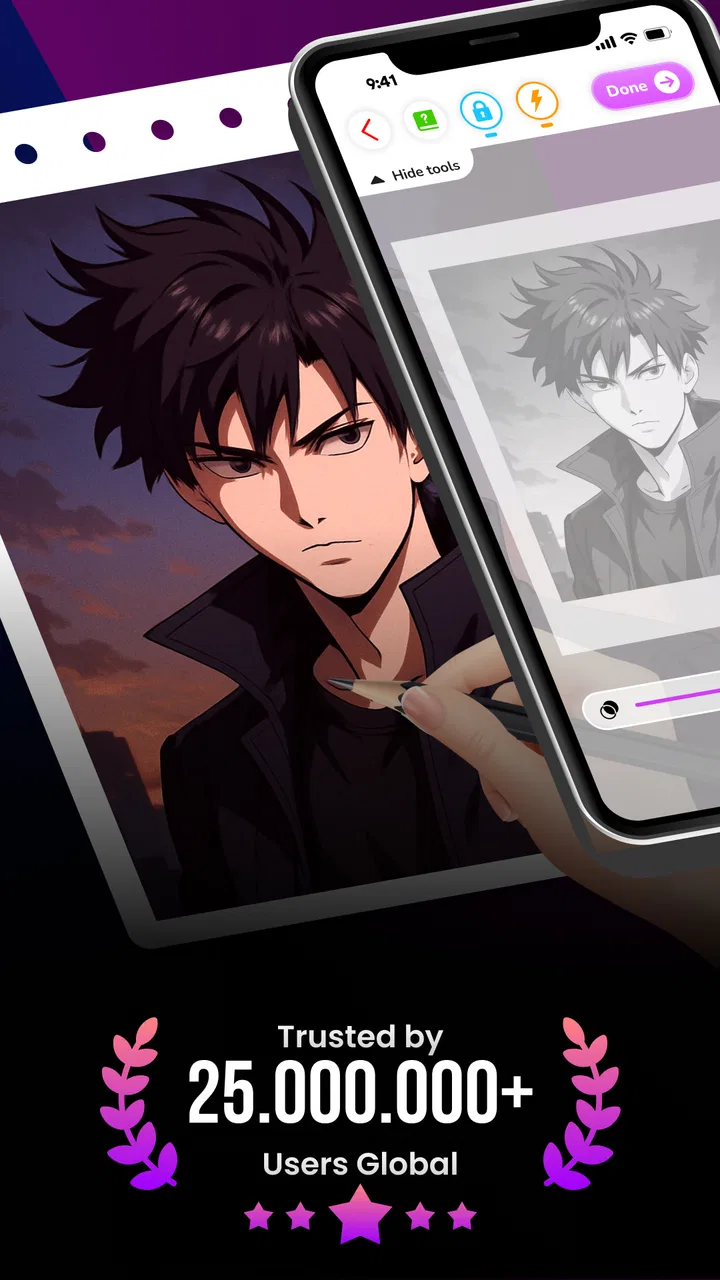
The app comes from Braly JSC and focuses on a simple promise: use augmented-reality tracing to help reproduce anime-inspired pictures on paper. That makes it very different from a conventional digital sketchbook. You are not mainly painting on the display with a finger or stylus. Instead, the phone acts as a visual guide while you draw on a separate surface. In my experience, that distinction determines whether you will enjoy it. If you want help with proportions and outlines, it is approachable. If you want layers, brushes, vector editing, or finished digital artwork, another kind of app will suit you better.
How it works when several people share the drawing space
A realistic use case is a quiet afternoon at home: one person selects an anime reference, places a sheet of paper on a table, and positions the phone so the guide appears over the page. A child can trace the larger shapes while an older sibling helps keep the device steady. Later, the roles can switch. That small division of work matters because the hardest part is not always drawing; it is keeping the projected image and the paper aligned while someone is moving a pencil.
You May Also Like

 AccuWeather: Weather Radar
AccuWeather Review: A Quick, Clear Forecast for Everyday Decisions
For everyday plans, the best forecast is the one you can understand quickly. AccuWeather makes rain timing, radar, and local conditions easy to act on, with a few trade-offs.

 Hill Climb Racing
Why Hill Climb Racing Still Turns Crashes Into One More Run
A tiny car, a bumpy hill and one more upgrade: Hill Climb Racing keeps resurfacing because its simple chaos makes every near-miss feel personal.

 AliExpress - Shopping App
AliExpress Makes Global Shopping Feel Personal, but Shoppers Bear the Risk
AliExpress turns a global marketplace into a pocket-sized discovery engine. Its reach is useful, its shopping loop compelling, and its trade-offs easy to miss.

 Lords Mobile: Kingdom Wars
Lords Mobile Is a Kingdom-Building Routine, Not a Quick Match
A case-by-case verdict on the building, battles, device demands, and social commitments that make Lords Mobile rewarding for some players and exhausting for others.

 PDF Scanner app - TapScanner
TapScanner Makes Paperwork Easier to Capture, Check, and Share
TapScanner makes scanning with a phone feel less like a rescue operation and more like a dependable step in getting work done. Its capture tools are useful, though not flawless.

 Block Blast!
 Shows How Much a Puzzle Game Can Leave Out
A quiet grid game shows why puzzle players increasingly value instant clarity, repeatable skill and low-pressure play—and where the genre still needs to catch up.
More From Our News Desk
View All News


I found the shared-device angle more useful than treating the app as a private art studio. The screen is something everyone needs to see, so passing the phone around during setup is natural, while the person drawing can concentrate on the paper. For a family activity, I would prepare the paper, pencil, eraser, and a stable place for the phone before opening the reference. This avoids the common problem of beginning with enthusiasm and then interrupting the session to search for supplies.
The app works best when the drawing surface is uncluttered and the person holding the phone is not also trying to trace. That sounds obvious, but it changes the experience. A small table with a loose phone in someone’s hand creates constant movement; a stable arrangement lets the artist focus on line quality. I would treat the first attempt as a setup exercise rather than expecting a polished character immediately.
There is also a useful social benefit: the person who is less confident at drawing can participate without feeling that they must invent a character from memory. The reference supplies direction, while the final result still depends on the user’s hand. In that sense, the app is more encouraging than a blank canvas, especially for beginners who freeze when faced with an empty page.
What the tracing approach changes
Tracing is not the same as learning every construction principle behind anime drawing. It can help with confidence, hand control, and noticing how outlines are arranged, but it does not automatically teach why a face, hand, or pose works. I would use each reference as a study prompt: after tracing the outline, try drawing one part again without the guide, then compare the two versions. That simple habit turns a guided activity into more meaningful practice.
Another practical tip is to begin with a light pencil rather than a dark pen. The guide may make the first pass feel accurate, but small alignment errors are normal, and light marks are easier to correct. Once the main shape looks right, the lines can be strengthened. This workflow is especially helpful for younger users, who may otherwise press hard and become frustrated when the proportions need adjusting.
The AR presentation can also create a misleading sense of precision. A line that appears perfectly placed on the screen may shift when the phone angle changes or when the user moves the paper. I recommend checking the major landmarks first: head size, eye position, shoulder line, and the outer silhouette. Details such as hair strands should come later. This is a better use of the guide than chasing every tiny line from the beginning.
Setting boundaries before handing over the device
Because the app is designed for drawing rather than messaging or social interaction, it is relatively easy to make it part of a focused household activity. Still, a shared phone or tablet has its own boundaries. I would decide in advance who chooses the reference, who handles the device, and where the finished drawings will be kept. These are simple arrangements, but they prevent the session from becoming an argument over turns or over which picture to use.
The app is free, which removes an obvious barrier for trying it with a family member or friend. Free access does not change the need for sensible device habits, though. I would avoid leaving the phone balanced precariously over the paper, and I would keep drinks and loose craft materials away from the screen. The tracing method needs the device to remain visible and correctly positioned, so basic physical care has a direct effect on the quality of the activity.
For a shared device, I prefer a short handoff routine. The person finishing a drawing can return the phone to the same viewing position, clear the paper, and explain whether the guide needs to be moved before the next person starts. This makes the app feel less like a personal account and more like a household tool. It also reduces the temptation for the next user to grab the device and begin while the previous setup is still unstable.
I would not assume that every family member will use it in the same way. A younger child may need help selecting a suitable reference and understanding that the screen image is a guide, not a result that must be copied perfectly. An older beginner may prefer to work alone and use the reference as a rough structure. Giving each person a different goal makes the app more enjoyable than insisting everyone produce the same kind of picture.
Keeping expectations realistic
The store summary presents the app as a way to create pictures and explore creativity, and that is a fair description of its role. It should not be mistaken for a full digital art package. I would not choose it for editing a finished illustration, adding sophisticated shading, organizing a large portfolio, or exporting a professional design workflow. Its strength is the bridge between a visual reference and a physical drawing surface.
That limitation is actually helpful in a household setting. A blank digital canvas can lead to endless tool choices, while a tracing activity gives everyone a clear starting point. The trade-off is that the experience is less flexible. If you want to combine several references, build your own reusable brush library, or make detailed digital corrections, a standard drawing app will offer more control.
The current version is 1.1.27, and the app supports Android 7.0 and later. That makes it a practical candidate for a household with an older Android device, provided the device can display the guide comfortably and the screen is large enough for the intended drawing area. I would test the arrangement before planning a group activity, because technical compatibility alone does not guarantee that the phone will be pleasant to use as a visual guide.
Coordinating a smoother drawing session
Coordination is where I noticed the biggest difference between a frustrating attempt and an enjoyable one. The person drawing needs a stable paper position, while the person managing the phone needs to make small adjustments without blocking the screen. A simple verbal system helps: say “hold,” “move left,” or “reset” instead of making sudden changes. This is particularly useful when a child is drawing and may lose track of the reference if the device shifts unexpectedly.
I also recommend separating the drawing into passes. First, trace only the broad outline. Second, check whether the main features sit in the right places. Third, add smaller details. This prevents the artist from spending time on eyes or hair before noticing that the head is tilted differently from the reference. It is one of the most valuable ways to use the app because it turns the AR overlay into a planning aid rather than a line-by-line race.
For two people sharing a device, alternating complete drawings is usually better than switching every few minutes. Frequent handoffs interrupt concentration and make it harder to remember where the guide was positioned. A better arrangement is for one person to finish a simple section or a full outline, then pass the role to the next artist. If several people want to participate, each can use a fresh sheet and compare approaches afterward.
Paper choice also affects the result. A loose sheet can slide, while a page in a notebook may be easier to keep in place but harder to reposition. I would start with inexpensive paper and a pencil, not a treasured sketchbook. That removes pressure and makes experimentation easier. Once the user understands how the phone position affects the guide, switching to better paper becomes more rewarding.
One non-obvious use is collaborative planning for a handmade card or room decoration. One person can trace the main anime figure, another can add color traditionally, and a third can decide how the image will be framed. The app does not need to produce the entire finished piece to be useful. It can provide the difficult initial structure, leaving the household to personalize the result with markers, colored pencils, or other materials.
Where it compares well with ordinary alternatives
Compared with copying an image from another screen, AR tracing reduces the need to keep looking up and down between a reference and the paper. That makes it more approachable for someone who struggles to judge proportions by eye. Compared with a digital sketchbook, it encourages a physical result and can feel more tactile. Compared with a traditional drawing tutorial, it gives faster visual feedback because the user starts with a concrete outline instead of a long sequence of lessons.
The compromises are just as important. A regular sketchbook app is better when you want undo, layers, color experiments, and easy revisions. A video lesson is better when your priority is understanding construction, gesture, anatomy, or shading. Freehand copying from a printed picture may be better when you want to strengthen observation skills without relying on an overlay. I see this app as a convenient middle ground, not a replacement for all three alternatives.
For a beginner, that middle ground is compelling. The app lowers the emotional cost of making the first mark, and the physical drawing can be kept, displayed, or modified by hand. For an experienced illustrator, the appeal is narrower. It may still help with a quick reference or a casual activity, but it will not replace the control of a proper digital workspace or the discipline of drawing from observation.
Age, trust, and choosing the right household role
The Everyone content rating makes the app broadly suitable for a general audience, and the art-focused format is easy to understand. Even so, age suitability is not the same as identical independence for every user. A small child may need an adult to prepare the surface and supervise the device, while a teenager may be comfortable handling the whole process. I would judge readiness by coordination and care with the phone, not only by the label.
Trust also matters when several people use one device. I would make it clear that the person holding the phone is responsible for keeping it steady and returning it safely, while the artist is responsible for the paper and drawing tools. This division avoids blaming the app when the real problem is a rushed handoff or a pencil placed on the screen.
If the device belongs to a parent, I would keep the activity within an agreed time and location, particularly if the phone is needed for calls or work afterward. The app itself may be the focus, but a shared phone remains a shared household resource. A tablet dedicated to creative activities can make coordination easier, yet a phone is perfectly workable for short sessions when everyone understands the arrangement.
I would also encourage users to treat the references as starting points rather than strict tests. Some children may compare their drawing with the on-screen guide and decide they are “bad” at art if the lines do not match. The better message is that the overlay is there to help with structure, while personal choices in expression, color, and detail are part of the finished work. This is where an adult or older sibling can add more value than the app alone.
Who should use it and who should skip it
I would recommend it to beginners who want a gentle entry into anime drawing, households looking for a screen-based activity that ends with something physical, and casual artists who enjoy following a visual guide. It is also a good fit for someone who has tried a blank canvas and found too many choices intimidating. The free price makes experimentation straightforward, and the general-audience positioning keeps the concept accessible.
I would skip it if your main goal is professional digital illustration, detailed animation production, or a structured art curriculum. I would also look elsewhere if you dislike holding a phone in position, prefer drawing entirely from imagination, or want powerful correction tools after every stroke. The AR method introduces a physical setup that some users will find engaging and others will find inconvenient.
One further trade-off is privacy and household control in practical terms: I would use it only on a device that the owner is comfortable sharing for a drawing session, and I would avoid treating a child’s access to the phone as automatic. The app’s Everyone rating supports broad use, but sensible supervision and clear device boundaries still belong to the household.
My household verdict after using the app
Draw Anime - AR Tracing App is a focused creative tool rather than a complete art studio. Its best idea is the direct connection between an on-screen guide and a sheet of paper, and that makes it especially effective for shared drawing sessions. I like that a beginner can start with a recognizable structure while still making a physical piece that reflects their own hand and choices.
Its rating is 4.3 from around 84 thousand ratings, and it has passed 10 million installs, which places it among widely tried apps in its space. Those figures do not remove the need to decide whether the tracing workflow suits you, but they do show that the concept has reached a substantial audience. The app is free, developed by Braly JSC, and released on January 8, 2025, so it feels like a current option for Android users who want to test this style of drawing.
My strongest recommendation is to use it deliberately: prepare the paper first, stabilize the phone, trace large forms before details, and let each person take a clear turn. That workflow turns the app from a novelty into a useful household activity. It also exposes the main weakness honestly: the experience depends on positioning, cooperation, and patience more than a conventional digital canvas does.
For a family or group of friends, I would choose it when the goal is relaxed experimentation, not perfect reproduction. For serious skill development, I would pair it with freehand practice or a proper drawing lesson. Used within those boundaries, it offers an inviting way to get past the blank page and make anime-inspired art together. My final view is that it is worth trying for guided, physical drawing, especially when the shared activity matters as much as the finished picture.
FAQs for Draw Anime - AR Tracing App
01What is Draw Anime - AR Tracing App and how does it work?
Draw Anime - AR Tracing App is an innovative tool designed for artists who want to learn or improve their anime drawing skills. Using augmented reality technology, the app overlays anime sketches onto real-world surfaces, allowing users to trace and refine their technique. This interactive approach makes learning more accessible and engaging.
02Is Draw Anime - AR Tracing App suitable for beginners?
Yes, Draw Anime - AR Tracing App is perfect for beginners. It provides step-by-step guides and a variety of templates to help new users develop their skills. The AR tracing feature simplifies the drawing process, making it easier for novices to replicate complex anime characters and scenes with confidence.
03What devices are compatible with Draw Anime - AR Tracing App?
Draw Anime - AR Tracing App is compatible with most modern Android and iOS devices. To utilize the augmented reality feature, your device should support AR technology. Ensure your operating system is up to date for the best performance and check the app's specifications on the download page to confirm compatibility.
04Are there in-app purchases or subscriptions in Draw Anime - AR Tracing App?
While Draw Anime - AR Tracing App offers a free version with basic features, it includes optional in-app purchases and subscription plans. These extras provide access to premium templates, advanced tutorials, and additional tools, enhancing the user experience for those looking to expand their drawing capabilities.
05How can I share my drawings created with Draw Anime - AR Tracing App?
Sharing your creations is simple with Draw Anime - AR Tracing App. Once your drawing is completed, you can save it directly to your device or share it via social media platforms like Instagram, Facebook, or Twitter. The app also supports sharing through email or messaging apps, allowing you to showcase your work easily.
Pros
- Intuitive interface for beginners.
- Wide variety of templates available.
- Augmented reality tracing feature.
- Regular updates with new content.
- Supports multiple languages.
Cons
- Premium features require a subscription.
- Occasional ads can interrupt usage.
- Limited offline functionality.
- AR feature may drain battery quickly.
- Requires stable internet for full access.

Draw Anime - AR Tracing App
Gallery